
From creative tools and smart home touches to practical travel tech, these gifts suit a range of interests and everyday routines. Check the recipient’s devices and available space before choosing; several gifts work best with compatible equipment or a little setup.
13 Tech Gifts to Make Christmas More Personal
1. XPPen Artist 13.3 Pro V2 Drawing Tablet
A Display for Digital Art
XPPen Artist 13.3 Pro V2 Drawing Tablet

- 13.3-inch fully laminated display with 88% NTSC color gamut and 178-degree viewing angle.
- Battery-free stylus supports tilt and 16,384 pressure levels.
- Includes a red dial, eight customizable shortcut keys, stand, and replacement nibs.
Best For: Digital artists, animators, or design students who want to draw on a screen.
2. Anker Prime 14-in-1 Docking Station
A More Connected Desk
Anker Prime 14-in-1 Docking Station

- Combines 14 connections, including dual HDMI, audio, and Ethernet options.
- Offers up to 160W total output and supports charging up to four devices at once.
- Works with compatible USB-C, USB4, or Thunderbolt laptops; check display and operating system limits.
Best For: A laptop user building a desk setup with displays and accessories.
3. Aurzen Roku D1R Smart Portable Projector
Big-Screen Movie Nights
Aurzen Roku D1R Smart Portable Projector

- Projects 1080p Full HD images on a screen size from 60 to 150 inches.
- Built-in Roku provides access to streaming apps; activation requires an account and internet connection.
- Auto focus and keystone correction help align the picture after positioning.
Best For: Someone who enjoys home or outdoor movie nights and has a suitable viewing space.
4. EPOMAKER x Aula F75 MAX Mechanical Keyboard
A Customizable Typing Setup
EPOMAKER x Aula F75 MAX Mechanical Keyboard

- Compact 75% layout with 80 programmable keys, a TFT screen, and a volume knob.
- Connects by Bluetooth, 2.4 GHz wireless, or USB-C cable.
- Hot-swappable design, RGB lighting, and adjustable kickstand support personalization.
Best For: A frequent typist, gamer, or desk setup enthusiast.
5. DAYBETTER Smart Wi-Fi LED Strip Lights, 100 ft
Color for a Favorite Space
DAYBETTER Smart Wi-Fi LED Strip Lights, 100 ft

- 100-foot multicolor strip can be cut at marked points every three LEDs.
- Tuya app, remote, Alexa, and Google Assistant offer control options; Wi-Fi setup requires 2.4 GHz.
- Music modes and scheduling let the recipient set lighting effects and routines.
Best For: Someone who likes customizing a gaming area, workspace, or entertainment room.
6. CUKTECH 45W 20,000mAh Power Bank
7. Bambu Lab P1S Combo 3D Printer with AMS
A Maker’s Next Project
Bambu Lab P1S Combo 3D Printer with AMS

- Enclosed CoreXY printer includes automatic bed leveling.
- AMS is required for the listed multi-color and multi-material printing capability.
- Supports filaments including PLA, PETG, TPU, PVA, PET, ABS, and ASA.
Best For: A hands-on maker who enjoys designing and printing objects.
8. ZWO Seestar S30 Pro Smart Telescope
Explore the Night Sky
ZWO Seestar S30 Pro Smart Telescope
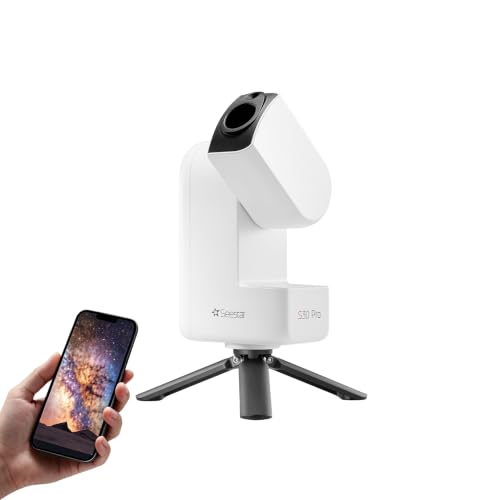
- App-controlled telescope includes automatic GoTo targeting and tracking.
- Captures 4K-quality images and offers one-tap modes for deep-sky objects, the Moon, and the Sun.
- Portable design weighs about 3.6 pounds; it is designed for deep-sky imaging, not planetary observation.
Best For: A curious beginner interested in astronomy and astrophotography.
9. iRobot Roomba 105 Combo Robot Vacuum and Mop
A Helpful Home Routine
iRobot Roomba 105 Combo Robot Vacuum and Mop

- Combines vacuuming and mopping, with options for vacuum-only or mop-only cleaning.
- LiDAR mapping, room targeting, and scheduling are available through the app.
- Automatically avoids carpets while mopping; setup and operation use a 2.4 GHz network.
Best For: Someone who appreciates practical home technology and scheduled floor care.
10. Bose QuietComfort Wireless Headphones
A Quieter Listening Break
Bose QuietComfort Wireless Headphones

- Over-ear headphones offer Quiet and Aware listening modes.
- Bluetooth multipoint supports switching between connected devices.
- Up to 24 hours of battery life, with USB-C charging and an included audio cable.
Best For: A music, podcast, or audiobook listener who commutes, travels, or works around distractions.
11. Aura Carver Black Digital Picture Frame
Memories on Display
Aura Carver Black Digital Picture Frame

- 10.1-inch HD screen adjusts brightness to the room’s lighting.
- The Aura app supports unlimited photo and video storage without a subscription fee.
- Can be preloaded with photos, videos, and a message; setup uses Wi-Fi.
Best For: A family member who enjoys seeing shared photos at home.
12. Samsung T7 Portable SSD, 1TB
Room for Creative Files

- Portable 1TB SSD with USB 3.2 Gen 2 connectivity.
- Listed read speeds reach up to 1,050 MB/s and write speeds up to 1,000 MB/s.
- Compact aluminum body has shock resistance and fall protection up to six feet.
Best For: Someone who needs portable storage for photos, videos, or project files.
13. Soundcore Boom 2 Outdoor Bluetooth Speaker
Sound for Shared Moments
Soundcore Boom 2 Outdoor Bluetooth Speaker

- Bluetooth speaker has a dedicated subwoofer and BassUp 2.0 technology.
- Up to 24 hours of playtime, varying with volume and audio content.
- IPX7-rated, floatable design and a built-in power bank suit outdoor use.
Best For: Someone who enjoys music at home, on trips, or outdoors.
Choosing Tech Gifts for This Recipient
Start with what the person already does. A digital artist may value a screen tablet, while someone who spends long stretches at a desk could appreciate a keyboard or docking station. For a curious stargazer, the smart telescope offers app-guided exploration. A photo frame, projector, or speaker suits recipients who like sharing entertainment and memories. Practical choices such as a power bank, portable SSD, or robot vacuum can support routines without requiring a new hobby.
Think about how much setup they enjoy. A maker may welcome the creative possibilities of a 3D printer, while a recipient who prefers a ready-to-use gift may find headphones or a digital frame easier to bring into daily life. The projector needs internet and a Roku account to activate. The drawing tablet needs a computer or laptop. These details can help you choose a gift that fits the recipient rather than simply picking the most feature-rich device.
Set a Budget Around the Full Setup
Tech gifts vary in the extra items or services they may involve. Before choosing, consider what the recipient already owns and whether the gift needs a compatible computer, phone, Wi-Fi network, display, or accessories. A docking station can make more sense when the recipient already has a compatible laptop and monitors. A portable SSD is a focused storage gift; a projector may become a larger entertainment setup depending on how they plan to use it.
For gifts that invite personalization, include time and materials in your planning. A mechanical keyboard supports switch and lighting customization, and a 3D printer opens the door to filament and design projects. A telescope or projector can also be more rewarding when there is a planned first outing or movie night. You do not need to bundle unlisted products; a handwritten note suggesting a first project or shared evening makes the gift feel considered.
Check Compatibility and Personalization
Compatibility is a particularly useful filter for technology gifts. Confirm the recipient’s computer operating system and ports before selecting the drawing tablet or docking station. The dock’s dual display behavior differs on macOS, and it is not compatible with Linux according to the supplied details. For smart home lighting or a robot vacuum, check that a 2.4 GHz Wi-Fi network is available. The projector needs internet access for activation, while the digital frame also relies on Wi-Fi to receive shared photos.
Personalization can come from how the gift is prepared. A digital frame can be preloaded with photos, videos, and a message. A keyboard’s programmable keys and lighting can be tailored by its owner. For the power bank, headphones, and SSD, think about which devices the recipient uses and whether they can connect or charge as intended. For a smart telescope, consider whether the recipient is comfortable using an app and has a place to set it down steadily for imaging.
Timing and Last-Minute Decisions
For Christmas planning, allow room to check setup requirements and prepare the gift. A digital frame can feel personal when photos are loaded in advance. A projector or connected home device may take time to connect to Wi-Fi and configure. A printer or telescope can make a memorable present, but the recipient may appreciate time to explore its features after the holiday.
If you are choosing closer to the occasion, favor gifts that match equipment the recipient already uses and have straightforward first steps. Headphones, a speaker, a portable SSD, or a power bank may be easier to understand at a glance, provided the recipient’s devices are compatible. For any connected or creative gift, include a short note with why you chose it and one idea for using it together. That small touch can turn useful technology into a more personal Christmas gift.